Still 1.0.8 is here · See what’s new
Something new

Small steps, release by release.

Every version of Still, straight from GitHub Releases. Updating keeps your preferences, alerts, to-dos and history.

Still v2.0.1

Latest9 November 2026
  • Windows protection works on new installs again. On a PC that never had Still 1.x, version 2.0.0 couldn’t start Still Guard, so turning on protection or starting a focus session showed “IO error in winapi call”. Updating repairs it: start a focus session once and approve the administrator prompt.
  • If Windows protection can’t be set up, Still now shows the Windows error itself.
Still v2.0.0

31 October 2026
  • Still for Windows is rewritten in Rust. Everything looks and works the same, and your preferences, alerts, to-dos, Something new entries, alarm sounds and history carry over untouched. A session that is running while you update keeps going.
  • Much smaller: the installer is about 5 MB instead of 140 MB, and Still takes about 10 MB on disk instead of 320 MB.
  • Lighter in the tray: a minute and a half after you close the window, Still runs in about 3 MB of memory instead of about 170 MB. Alarms, sessions and protection keep working, and Still opens again in about half a second.
  • Finding your installed apps takes about 2 seconds instead of 10 to 30.
  • Still now uses the WebView2 runtime that comes with Windows 10 and 11, instead of bringing its own browser engine.

Still v1.2.0

17 October 2026
  • New Something new page on Windows. It asks one question: what new thing will you do today? Plan it, or log something you already did, on today or any other day. Nothing starts a focus session or blocks anything.
  • A calendar marks every day with something new on it, and Your progress shows the same calendar and list, so a change in one shows in the other. Your entries are saved with your preferences, and older preference files load unchanged.
  • Add your own alarm sounds on Windows: drop audio or video files into the AlertSounds folder and they appear in the alarm sound list. A button in the alarm editor opens the folder.
  • On the Android preview, switching pages no longer plays the system slide, so pages change straight away.

Still v1.1.6

29 September 2026
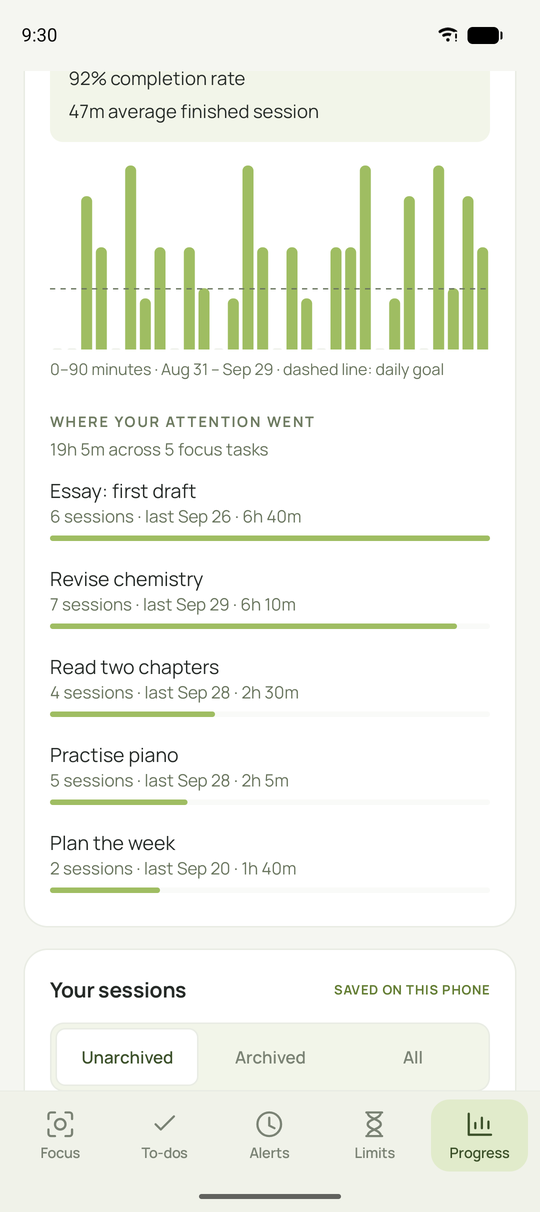
  • Where your attention went now counts a task once however you type it. “Clean school equipment” and “Clean School Equipment” share one row, one colour and one total, shown with your latest spelling.
  • Colours you’ve already picked stay put, and your saved history isn’t changed. This works the same on Windows and Android.
Still for Android: Where your attention went, with Revise chemistry counting both of its spellings as one task

Still v1.1.5

29 September 2026
  • The easier-to-read font in Settings → Made to fit you is now Atkinson Hyperlegible, a typeface the Braille Institute designed so letters and numbers like I, l and 1 or O and 0 are easy to tell apart.
  • It comes with Still on both Windows and Android, so it looks the same everywhere. Before, Windows used Verdana and Android used the phone’s own font.

Still v1.1.4

29 September 2026
  • The Android preview has a Settings page, behind the sliders button at the top right of every page, with the same Made to fit you options as Windows: text size up to 175%, high contrast (in light and dark), an easier-to-read font, stronger focus outlines, a gentler pace and a reset. Alarm screens follow them too.
  • On Android, an alarm missed while the phone was off now rings as a late reminder instead of being skipped, like on Windows.
  • Android also gets Reminders count as focus: press Let’s focus on a reminder-only alarm to add the rest of its focus window to Your progress.
  • Fixed on Windows and Android: saving a new alert, or switching a paused one back on, no longer rings a window that already ended today as a late reminder. It starts from the next one.

Still v1.1.3

29 September 2026
  • Every website in the Still · Website focus settings page now shows its logo, like in Still.
  • Hovering the extension no longer says “reconnect Windows protection” when Still is connected. It tells you to turn on Allow in Incognito (or InPrivate) when private windows aren’t covered.
  • If Still for Windows doesn’t recognise the copy of the extension you’re using, the extension now says so and how to fix it, instead of saying Still isn’t responding.
  • Still’s own copy of the extension now always reloads after Still updates, so it never keeps running older code.

Still v1.1.2

29 September 2026
  • The Still · Website focus extension has a redesigned settings page (click its toolbar icon) that looks and feels like Still for Windows.
  • Toggle switches instead of tick boxes, quick session lengths from 15 minutes to 4 hours, and the same dark bedtime bar as Time limits.
  • Block screens are chosen from the same tiles as in Still, with a live preview beside them, and a simple Choose file row for your own image.
  • The extension now says clearly what it does: it blocks websites on its own, and for more control (blocking apps, scheduled sessions and sessions you can’t end early) we recommend using it together with Still for Windows.

Still v1.1.1

29 September 2026
  • The Still · Website focus extension works on its own, and with Still for Windows it gains app blocking and sessions you can’t end early.
  • When you use both, they work together instead of getting in each other’s way: a website stays on hold while either one holds it, the stricter daily limit wins, and neither can end the other’s session.
  • In high contrast mode, the “Can’t use the store? Load it from this PC instead” dropdown in Settings is now full black like the rest of the text.

Still v1.1.0

28 September 2026
  • New Made to fit you section at the bottom of Settings with accessibility options.
  • Text size menu from 100% to 175%. It scales everything, not just the words, and the layout rearranges itself to fit smaller windows.
  • High contrast mode with black text on white, strong borders and clear on/off switches.
  • An easier-to-read font (Verdana), stronger keyboard focus outlines, and a reset button. Reduce motion (A gentler pace) now lives here too.
  • Alarm screens follow your text size, contrast, font and focus choices.
  • The website block screen choices now wrap in narrow windows instead of running off the edge.
  • The browser extension, Still · Website focus, is on the Chrome Web Store. It works on its own with its own website list, sessions, daily limits and bedtime, or as Still’s companion. Settings → Set up browser companion now opens the store page, with loading it from your PC kept in a dropdown below. If the extension isn’t added in Chrome or Edge yet, the button gently pulses until it is.
  • New Alarms after you quit setting keeps alerts ringing after you quit Still from the tray. Alarms missed while the PC slept ring when it wakes, labelled as late.
  • Pressing Let’s focus on a reminder-only alarm can add its focus window to Your progress, once you switch on Reminders count as focus in Settings.

Still v1.0.9

28 September 2026
  • Settings and A little guidance no longer get cut off at the bottom of the sidebar in shorter windows.
  • On smaller screens the sidebar makes room by hiding its note and picture and tightening its spacing, and it can scroll if it still doesn't fit.

Still v1.0.8

25 September 2026
  • The minimise, maximise and close buttons at the top of the window now sit exactly in the middle of their buttons.
  • The close button on alarm screens and the installer window buttons are centred too.

Still v1.0.7

25 September 2026
  • The Android preview can now move to-dos: drag a line's ⌃⌄ handle up or down. It lifts, the other lines glide out of its way, and it settles back when you let go, just like on Windows.
  • No changes to the Windows app.

Still v1.0.6

25 September 2026
  • Moving a to-do now feels smoother: the line you're dragging lifts and grows a little, the other lines glide out of its way, and it settles back to its normal size when you let go.
  • Moving a line with the arrow keys glides too.

Still v1.0.5

25 September 2026
  • The Android preview now shows its real version in App info, and each new preview installs over the last one as an update.
  • No changes to the Windows app.

Still v1.0.4

25 September 2026
  • An early preview of Still for Android (Android 11 or newer) is now included with each release, for testing. It isn't a finished release yet.
  • No changes to the Windows app.

Still v1.0.3

25 September 2026
  • Hold a line in your to-do list (or right-click it) to select lines. Pick a few, or use Select all, then delete them together. Undo delete puts them back.
  • While selecting, drag the ⌃⌄ handle to move a line up or down the list, or focus it and use the arrow keys.

Still v1.0.2

24 September 2026
  • Works with more Windows setups: folders and account names with accents, apostrophes, %, & or brackets, and redirected folders.
  • Setup checks that your PC meets the requirements (Windows version and updates, .NET, PowerShell) before installing, and explains what to fix if it doesn't.
  • The app and Setup windows fit on small screens and at high display scaling.
  • Uninstalling is safer: it only ever removes Still's own folder.
  • Clearer messages on non-English Windows, and a helpful message if Still can't start.

Still v1.0.1

24 September 2026
  • The browser companion now refreshes itself automatically after updates: Still updates its files when it starts, and the companion reloads within a minute. Blocking rules stay in place.

Still v1.0.0

24 September 2026

The first release with an installer.

  • Still Setup: install, update and uninstall for your Windows account, with no administrator approval needed.
  • Alerts: scheduled reminders with full-attention, focus-card and quiet styles, custom media and optional blocking.
  • Website blocking for Chrome and Edge with calm block screens, custom screens and redirects.
  • Time limits: daily website allowances with a bedtime switch.
  • To-do list, progress charts, session calendar and history export.

Looking for older builds? All releases on GitHub